Everything PanelCraft does, in one reference
PanelCraft is cabinet design software with a cut list optimizer, panel nesting, quotation and machining export in one program. This page lists every capability by group, what it does, where it matters in the shop, and which plan includes it.
Basic: design, parts, cutting. Pro adds pricing, quotes, clients and PDF documents. Studio adds room view, machining export and team features.
Cabinet design
Draw wardrobes, kitchens, desks, bookcases and any panel furniture. Parametric kinds are quick starting points; Freeform is the foundation. Details: Design.
| Capability | What it does | Where it matters | Plan |
|---|---|---|---|
| Freeform panel design | Build furniture panel by panel with select, move, rotate, resize, add panel, add-here and measure tools. | One-off pieces and custom niches that presets cannot express. | Basic |
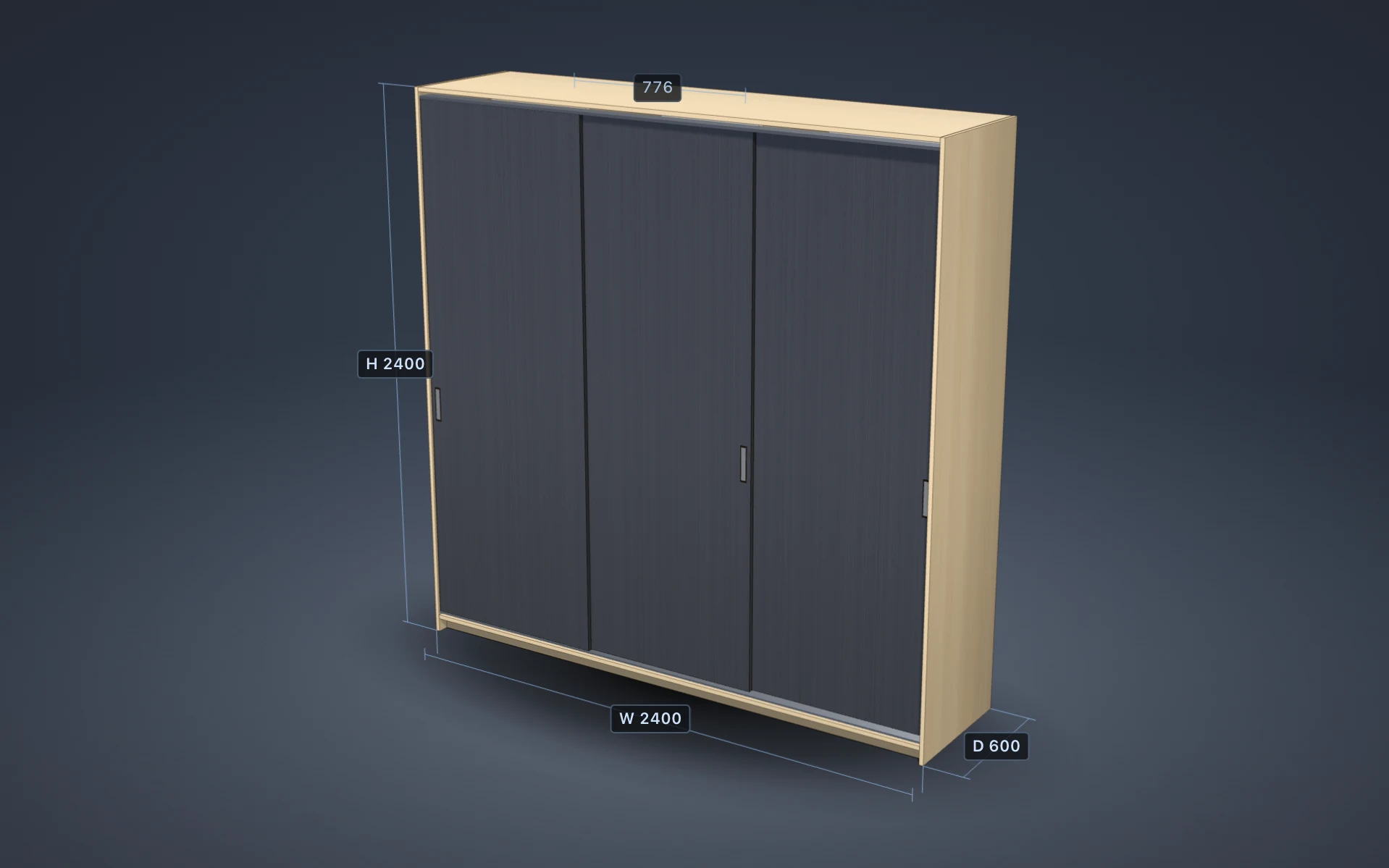
| Parametric kinds | Wardrobe, TV unit and chest of drawers driven by dimensions, compartments, shelves, doors and drawers. | Fast first quotes for standard pieces. | Basic |
| Convert to freeform | Turns a parametric design into editable panels in one undo step, with parts and price unchanged. | Adding a custom twist to a standard cabinet. | Basic |
| Snapping and grid | Snap to a 1 to 50 mm grid and to faces and centres of other panels, with magenta alignment guides. | Accurate joints without typing numbers. | Basic |
| Live collision feedback | Colliding panels turn red while you drag, with a count in the readout; grooves and touching faces are allowed. | Catching impossible geometry before it reaches the saw. | Basic |
| Rotated and shaped panels | Any yaw angle; rectangle, trapezoid, chamfer and notch outlines with true edge lengths. | Corner units, L-shaped desks and angled parts. | Basic |
| Arrays and mirrors | Repeat or mirror panels live, optionally with a rotation step, then bake them. | Repeated shelves, symmetrical units, rings of panels. | Basic |
| Sliding doors, flip doors, rail, back, plinth | Parametric additions to any compartment with a translucent preview before they enter the model. | Wardrobes and media units. | Basic |
| Corner unit and L-shaped desk builders | Dialogs that create L-shaped cabinets and desks from a few dimensions and refuse impossible sizes. | Corners in kitchens, offices and bedrooms. | Basic |
| Hardware suggestions | Connectors, hinges, handles, slides and legs proposed with reasons; applied only when ticked. | Complete hardware lists without forgetting a hinge. | Basic |
| Undo and redo | Every edit, including every drag, is one history step. | Exploring variants safely. | Basic |
Cut list optimizer and panel nesting
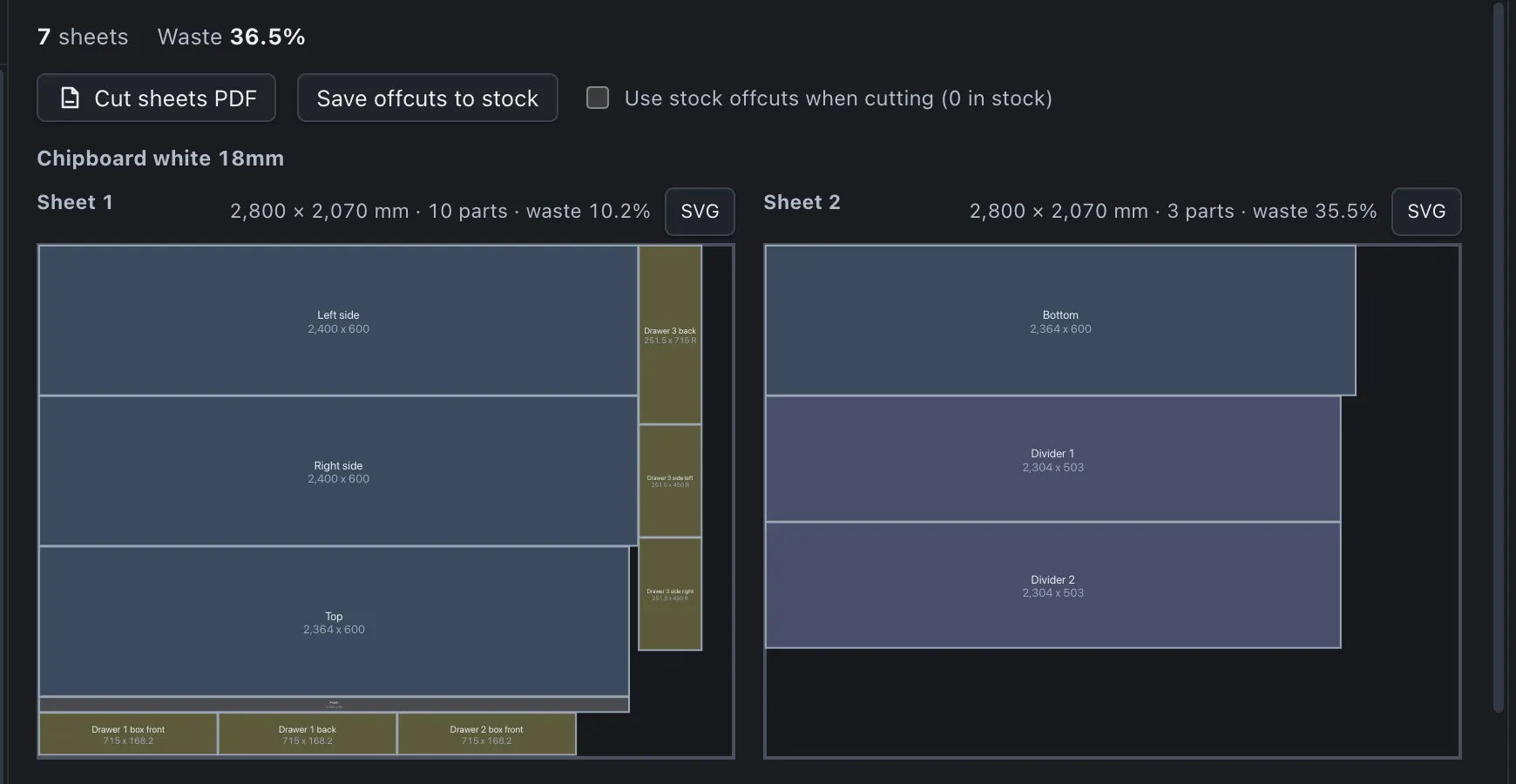
A guillotine nesting engine that respects the saw. Details: Cutting and nesting.
| Capability | What it does | Where it matters | Plan |
|---|---|---|---|
| Panel nesting | Guillotine free-rectangle packing per board, edge to edge cuts a panel saw can make. | Layouts that are actually cuttable. | Basic |
| Saw kerf and sheet trim | Kerf defaults to 3.2 mm and trim to 10 mm; no kerf gap at trimmed edges. | Parts that fit on the real sheet. | Basic |
| Grain direction | Fixed orientation when board and part carry grain; rotation where allowed. | Veneered and woodgrain boards. | Basic |
| Variant search | Five orderings, rotation on or off, two split rules and two fit scores; fewest unplaced parts, then fewest sheets, then largest offcut. | Lower waste without manual puzzling. | Basic |
| Alternate sheet sizes | Each purchasable size is tried; the cheapest complete result wins. | Buying 2440 × 1220 against 2800 × 2070 sheets. | Basic |
| Offcut stock | Save offcuts to a ledger and use them first, at no cost. | Using leftovers instead of buying sheets. | Basic |
| Cut sheets | One A3 sheet per page at true scale with part ids, sizes, grain arrows and kerf; PDF and SVG. | Handing the saw operator a layout. | SVG: Basic; PDF: Pro |
| Panel labels | One label per physical panel with name, size, board and banded edges. | Identifying parts after cutting. | Pro |
| Cut list CSV | Parts per sheet as CSV with formula-safe text cells. | Feeding a saw or a spreadsheet. | Basic |
| Background computation | The optimiser runs in a worker and only reruns when something that affects it changes. | An editor that never freezes. | Basic |
Boards, edge banding, hardware and decors
Libraries with sheet sizes and prices, and decor images for a realistic model. Details: Materials and decors.
| Capability | What it does | Where it matters | Plan |
|---|---|---|---|
| Board library | Kind, thickness, grain, sheet size, price per sheet and alternate sizes, searchable and sortable. | Pricing from the boards you really buy. | Basic |
| Edge banding | Thickness, height and price per metre, selectable per panel edge; 5 % allowance in the quote. | Mixed tapes on one piece. | Basic |
| Hardware library | Categories and units, by the piece or by the metre with decimals. | Tracks, rails and fittings priced correctly. | Basic |
| Decor textures | Built-in decors or imported images with a physical sample size; display only. | A model that looks like the finished piece. | Basic |
| Decor folder import | Up to 100 images validated by content and mapped to boards. | Loading a supplier’s whole collection. | Basic |
| CSV import and export | Boards, banding and hardware with templates, separator detection and strict number rules. | Moving libraries between computers. | Basic |
| Back panel splitting | Splits a back that exceeds the sheet into the fewest strips that fit. | Tall wardrobes on standard sheets. | Basic |
Quotation software for joiners
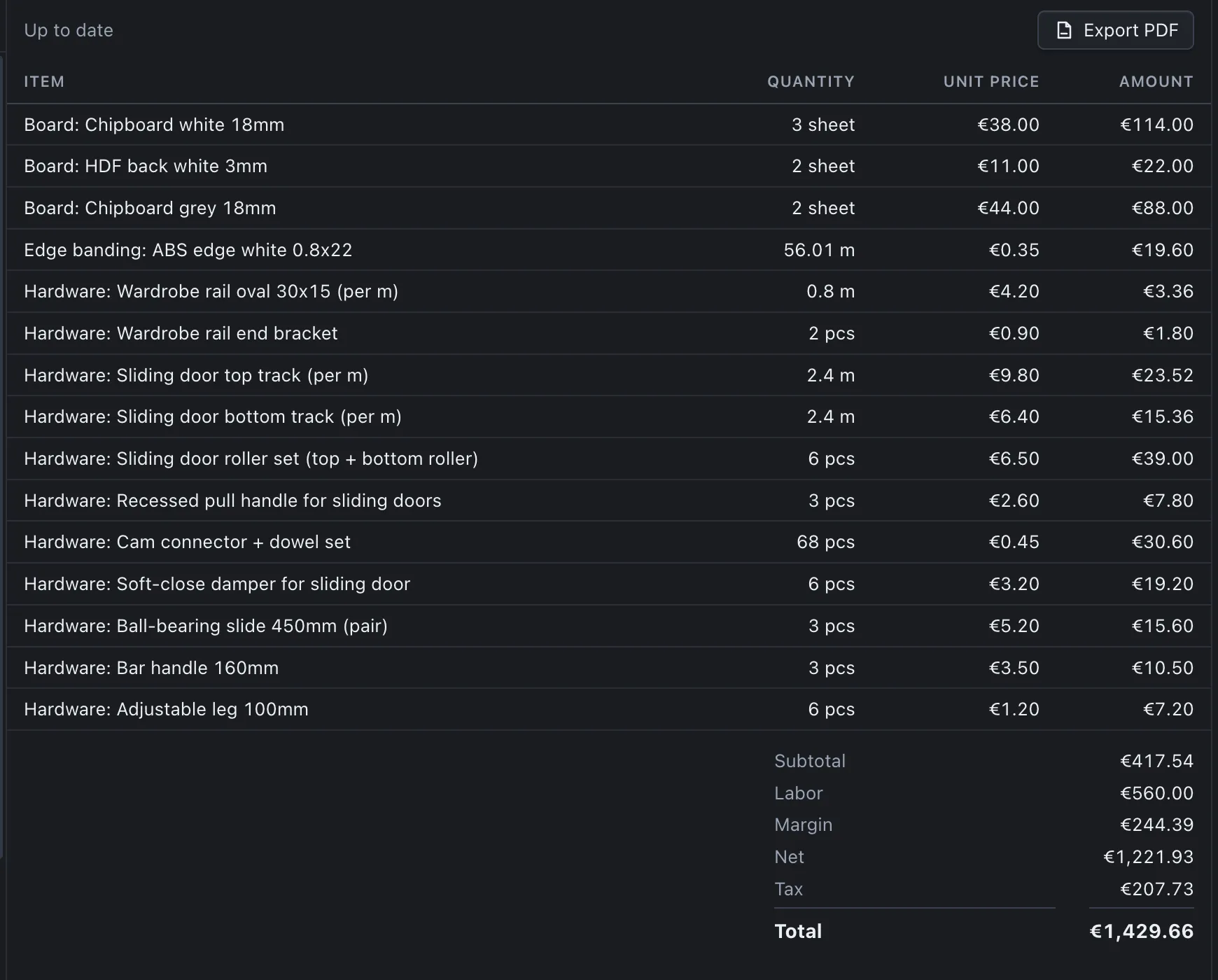
Prices derived from the design, with every line visible. Details: Pricing and quotes.
| Capability | What it does | Where it matters | Plan |
|---|---|---|---|
| Live estimate range | A price range that follows every edit, with a true lower bound. | Quoting on the phone while you design. | Pro |
| Exact quote | Boards by sheets used, banding by true edge length, hardware, then labour, margin and tax, rounded half-up in sequence. | A quote you can defend. | Pro |
| Supplier price-list import | CSV with column mapping and a preview of every change; nothing applies until confirmed. | Updating prices without retyping. | All plans |
| Ambiguous number protection | Numbers like 2.800 are rejected with both readings, never guessed. | Silent errors in imported prices. | All plans |
| Warnings on incomplete quotes | Unplaced parts, missing library entries and old price lists are flagged. | Never sending a quote that is too low. | Pro |
| Client records and quote status | Clients, quote numbers, validity, status, and frozen snapshots of sent quotes. | Keeping what you promised. | Pro |
| PDF quote | Client block, quote number, validity, notes and itemised lines in your document language. | The document the customer signs. | Pro |
Drawings, assembly and the workshop pack
Documents generated from the design. Details: Documents and drawings.
| Capability | What it does | Where it matters | Plan |
|---|---|---|---|
| Dimensioned drawings | Front, side and plan views on A3 at true scale with dimensions and a title block; PDF and SVG. | Shop drawings and client approval. | SVG: Basic; PDF: Pro |
| Assembly sheet | Steps in building order with parts and fittings per step. | Assembling and fitting. | Pro |
| Workshop pack | Eight files in one dated folder with a per-file report. | Handing a whole job to the shop. | Basic: 2 CSV; Pro: 6; Studio: 8 |
| Client pack | Preview image, quote and drawings in one folder. | Sending an approval package. | Basic: preview; Pro: all |
| Document language | Quote, labels, drawings and assembly sheet in a language chosen separately from the interface. | Working in one language, quoting in another. | Pro |
DXF and CSV machining export
Neutral machining data per sheet. Details: Machining export.
| Capability | What it does | Where it matters | Plan |
|---|---|---|---|
| DXF R12 export | Part contours, holes and hinge cups on one layer per sheet and drill size, sheets side by side. | Cutting services and CAM software. | Studio |
| Machining CSV | One row per operation with sheet, part, face, X, Y, diameter, length and depth. | Scripts and spreadsheets. | Studio |
| Hinge cup boring | 35 mm cups, 12.5 mm deep, positioned by door height and hinge side. | Doors that are ready to hang. | Studio |
| 32 mm system holes | Shelf-pin rows on sides and dividers with a common pitch origin per interval. | Adjustable shelving. | Studio |
| Cable holes | Through holes from panels that carry them, checked against the outline. | Desks and media units. | Studio |
| Export guard | Blocks the export when parts are unplaced or the layout is stale. | Never machining an old version. | Studio |
Room view
The design placed in a customer’s photograph. Details: Room view.
| Capability | What it does | Where it matters | Plan |
|---|---|---|---|
| Camera calibration | From four floor corners or from vanishing lines, with a fit check. | Placing furniture to scale in a photo. | Studio |
| Placement | Drag, nudge, rotate, lock to the back wall with a gap. | Showing where the piece will stand. | Studio |
| Light and shading | Direction, height, shading strength, brightness and warmth matched to the photo. | A convincing presentation. | Studio |
| Image and PDF export | PNG or JPEG with a title block, or an A4 presentation page with an optional quote summary. | The customer meeting. | Studio |
Platform, languages and data
How PanelCraft runs and where your data lives. Details: Security and data.
| Capability | What it does | Where it matters | Plan |
|---|---|---|---|
| Windows and macOS | A desktop application for both systems, licensed per user. | Working where the shop works. | All plans |
| Six languages | English, Bosnian/Croatian/Serbian, German, French, Italian and Spanish, with locale-aware numbers and dates. | Multilingual workshops and clients. | All plans |
| Works offline | All design, cutting, pricing and documents run locally; the licence is checked online when due. | Workshops with patchy internet. | All plans |
| Files you own | .panelcraft projects, local libraries, a local client database; no upload. | Control and backups. | All plans |
| Team features | Features for working together in a team. | Shops with more than one person drawing. | Studio |
The program in pictures

Try every feature for 14 days
Download PanelCraft for Windows or macOS and run a real job through it, from drawing to quote. The 14-day trial includes every Studio feature.
Questions first? Write to hello@panelcraft.store or see the FAQ.