PanelCraft FAQ: design, cutting, quotes and billing
Short, precise answers about what PanelCraft does and how it works, grouped by topic. If yours is not here, write to hello@panelcraft.store.
Plans and billing questions are also answered on the pricing page.
General
What is PanelCraft?
A desktop application for cabinet makers and joinery shops. You draw any panel furniture, and the same design produces the cutting layout, the priced quote, the drawings and the machining files.
Which systems does it run on?
Windows 10 or later and macOS 11 or later. See the download page for the requirements.
Who is it for?
Joinery and cabinet shops, furniture makers, kitchen and wardrobe fitters and designers who quote panel furniture cut from chipboard, MDF and plywood.
How is it different from a cut list optimizer on its own?
An optimizer starts from a list of sizes you typed. PanelCraft starts from the design, so the list, the layout, the price and the documents are all derived from it and cannot drift apart when the design changes.
Does it do solid timber or curved parts?
PanelCraft is built for panel furniture. Parts are boards that can be rotated about the vertical axis and shaped with trapezoid, chamfer and notch outlines.
Is there a web or mobile version?
PanelCraft is a desktop application for Windows and macOS. Your data stays on your computer.
Design
Can I design pieces that are not presets?
Yes. Freeform design is the foundation. Parametric wardrobes, TV units and chests of drawers are starting points, and any of them converts to freeform in one undo step.
What tools does Freeform have?
Select, Move, Rotate, Resize, Add panel, Add here (shelves, splits, doors, drawers, sliding doors, rail, back, plinth) and Measure, with snapping, collision feedback, arrays and mirrors.
Can panels be rotated or shaped?
Yes. Panels rotate about the vertical axis to any angle and can take trapezoid, chamfer or notch outlines. Shaped parts are cut from their bounding rectangle and the waste is priced.
Does it support sliding doors?
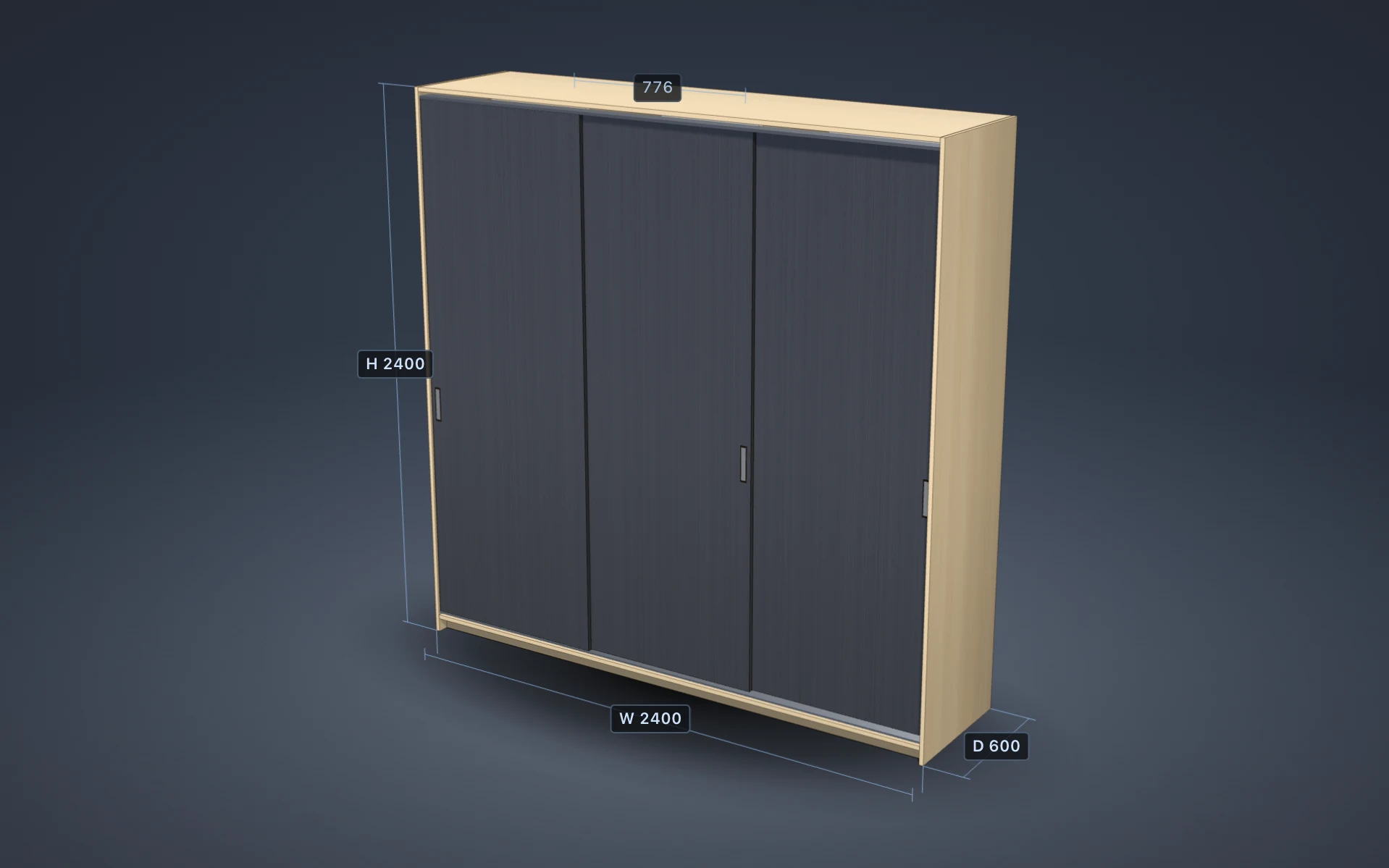
Yes: two, three or four doors with overlap, track heights, lane offset, reveal, handles and soft close, with a preview before anything enters the model.
Does PanelCraft choose hardware for me?
It suggests connectors, hinges, handles, slides and legs with the reason for each. Nothing is added until you tick it. Hinges per door follow the door height.
What if my back panel is bigger than a sheet?
A parametric back that does not fit the sheet is split into the fewest vertical strips that do, aligned to the dividers where possible, and you are told.
Cutting and nesting
Does it account for the saw kerf and edge trim?
Yes. Kerf defaults to 3.2 mm and trim to 10 mm, and both are settings. There is no kerf gap at a trimmed sheet edge.
Can I keep the grain direction?
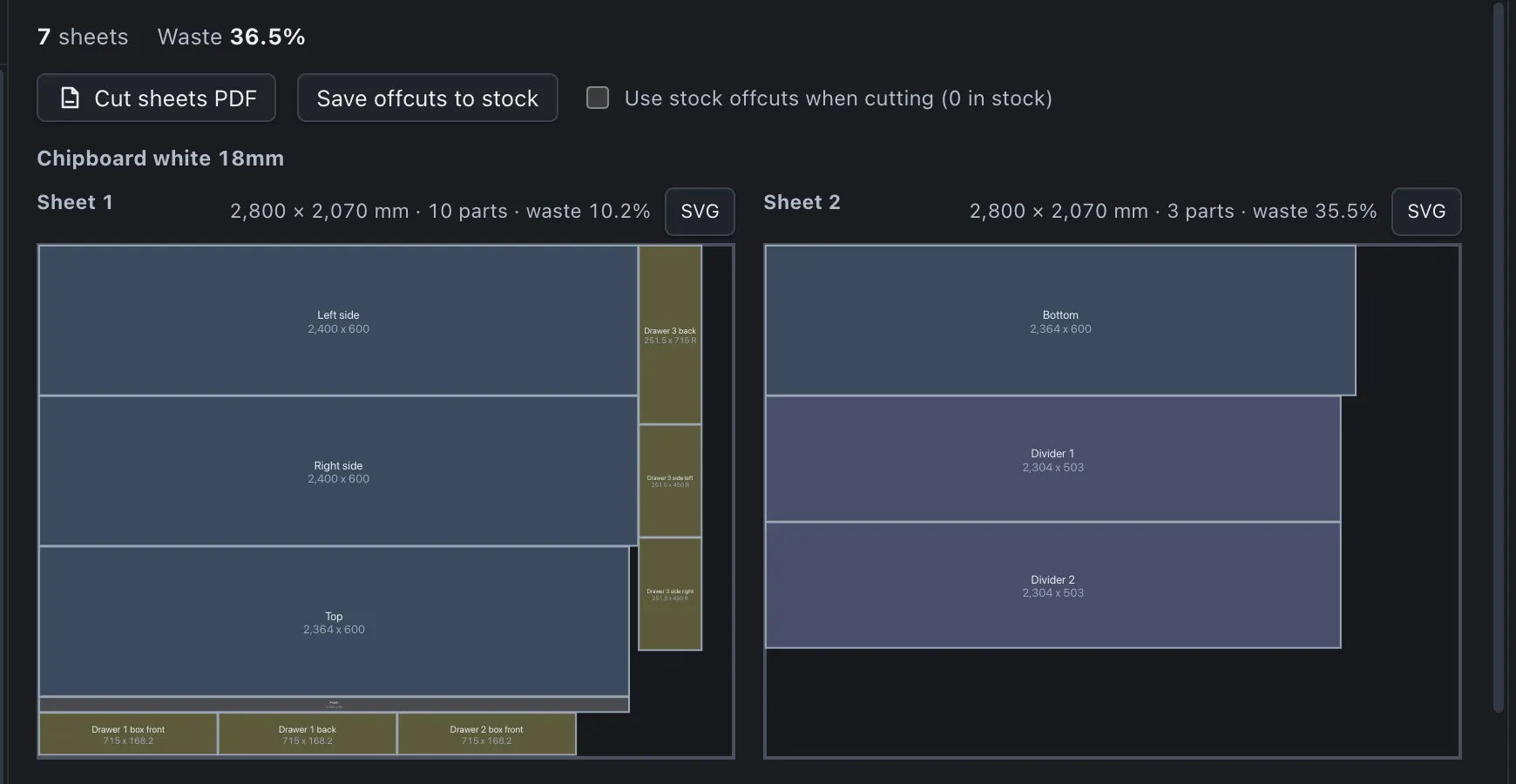
Yes. When board and part both carry grain the orientation is fixed; otherwise the optimiser may rotate the part. Cut sheets show grain arrows.
Are the layouts cuttable on a panel saw?
Yes. The packer produces guillotine layouts, in which every cut runs edge to edge.
Can I reuse offcuts?
Yes. Save offcuts to stock after a job and tick the stock option on the next one; those pieces are used first at no cost.
Can I buy sheets in more than one size?
Yes. Add alternate sheet sizes with prices to a board; each is tried and the cheapest complete result wins.
How long does the optimiser take?
It runs in the background as you edit. In our benchmarks 600 parts on one material take about 40 milliseconds and a typical wardrobe about a millisecond and a half.
Pricing and quotes
How is a quote calculated?
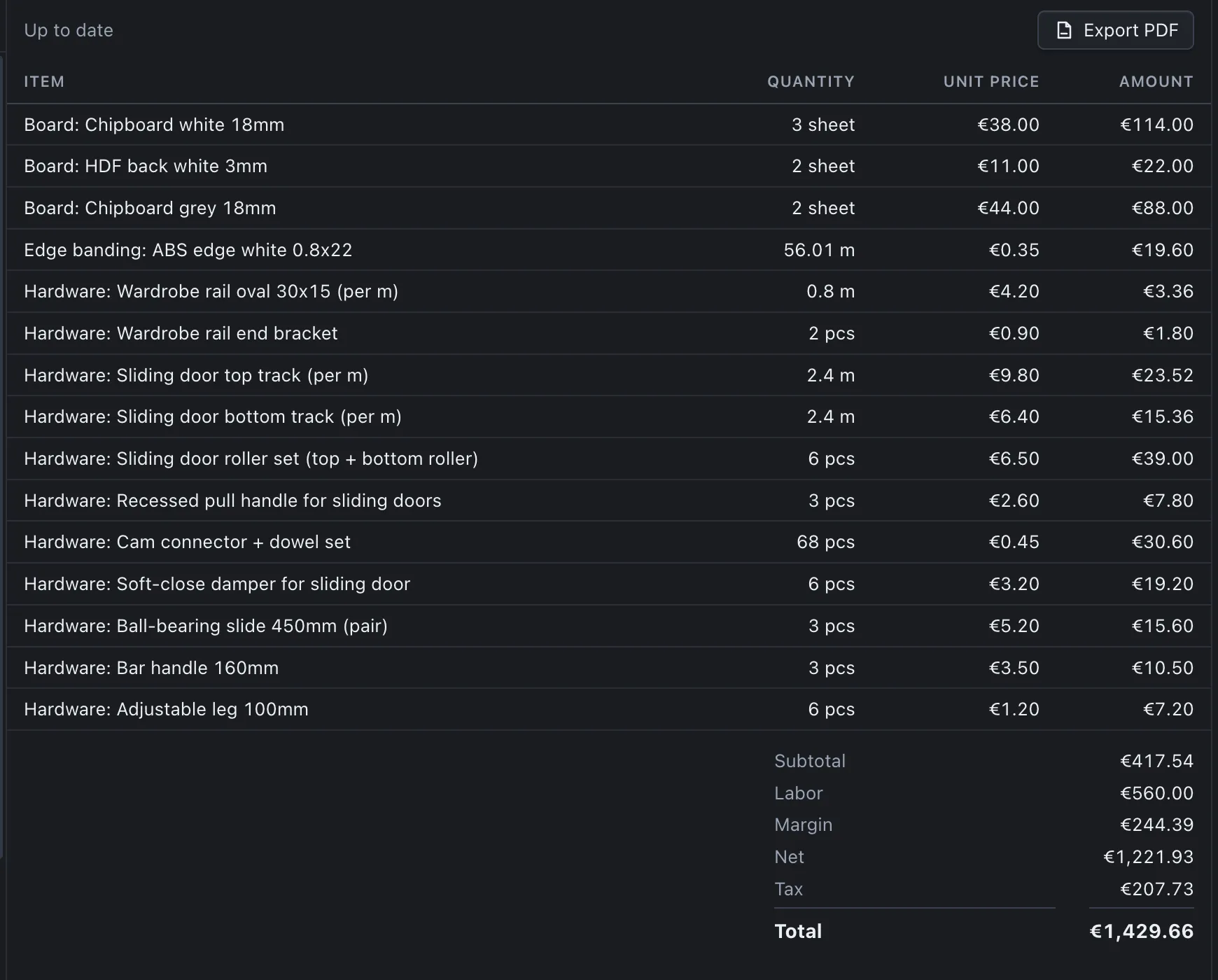
Boards by the sheets the cut layout uses, edge banding per type from true edge lengths with a 5 % allowance, hardware by quantity or by the metre, then labour, margin and tax in that order, rounded half-up to two decimals in sequence.
What is the difference between Estimate and Exact?
While the cut layout is still being computed the status bar shows an estimate range. When the layout is final it shows the exact quote total. The exact total has been inside the estimated range in 98 % of our test projects.
Can I import my supplier’s price list?
Yes, as CSV, with column mapping and a preview of every change. Nothing applies until you confirm, and ambiguous numbers such as 2.800 are rejected rather than guessed.
What if something is missing from the quote?
An unplaced part or a missing library entry is flagged on the quote and the interface does not present it as final.
Can I keep clients and quote numbers?
Yes, on Pro and Studio. Clients, quote numbers, validity and status are stored in a local database, and a sent quote keeps its lines and total.
Can the quote be in another language?
Yes. The document language is set separately from the interface language, so you can print a quote in your client’s language.
Documents and machining
What is in the workshop pack?
Cut sheets, cut list, panel labels, assembly sheet, drawings, parts list and the machining DXF and CSV: eight files in one dated folder. Basic writes the two CSV files, Pro six files and Studio all eight.
What does the machining export contain?
Part contours, cable holes, hinge cups and optional 32 mm shelf-pin holes in sheet coordinates, as DXF R12 and as CSV.
Which machines does it work with?
The files are neutral formats that cutting services and CAM software read. They do not depend on a machine vendor.
Which coordinate system do the files use?
The origin is the bottom-left corner of each sheet, X along the sheet length, Y up, in millimetres, in both the DXF and the CSV.
Are drawings to scale?
Yes. Drawings are A3 landscape with the smallest standard scale that fits, and the SVG is sized in paper millimetres.
What is room view?
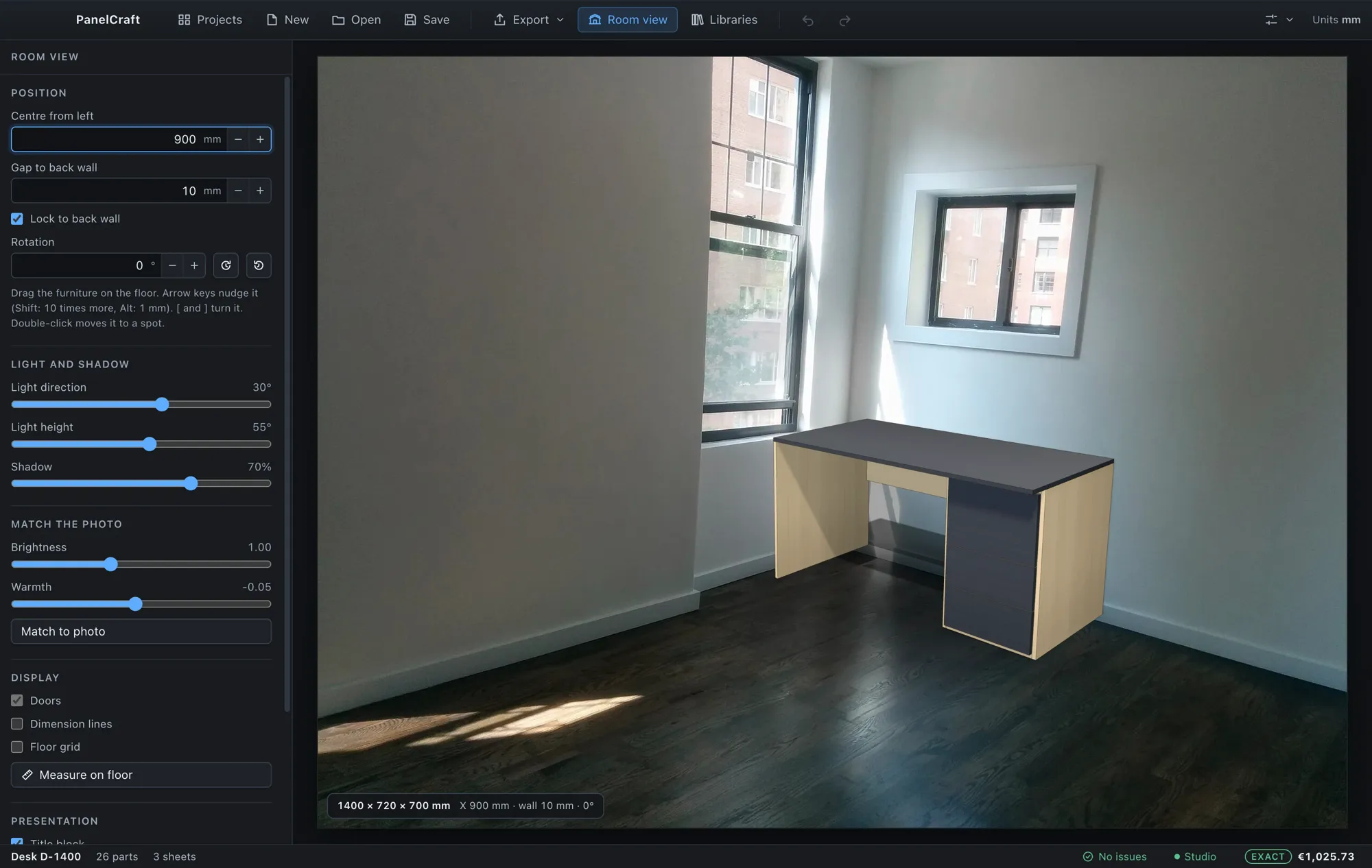
A presentation view that places the design to scale in your customer’s photograph. You calibrate the camera from the floor, place the piece, set the light and export an image or a PDF page. It is part of Studio.
Data, offline use and security
Where are my files stored?
Projects are .panelcraft files wherever you save them. Libraries, clients, decor images and settings are in the application’s data folder on your computer. Nothing is uploaded.
Do I need an internet connection?
Not to work. The licence is checked online when it is due and keeps working through a grace period of several days offline.
Can I move projects to another computer?
Yes. Copy the .panelcraft file. Import your decor images and libraries there, and the project opens as it was.
Is my data used for anything else?
PanelCraft does not upload your designs, prices, clients or photos. See the privacy policy and the security page.
How do I activate a licence?
Choose File > License, enter your licence key and activate. The licence is stored as a signed token on your computer.
What are the file size limits for imports?
Projects up to 50 MB, CSV files up to 10 MB, decor images up to 8 MB each, room photos read up to 40 MB and stored at up to 10 MB.
Plans, trial and billing
What does the trial include?
14 days from first launch with all Studio features, no payment details needed.
What do the plans cost?
Basic EUR 19, Pro EUR 39 and Studio EUR 79 per month, or EUR 190, 390 and 790 per year. See the pricing page.
Which plan do I need for quotes?
Pro includes pricing, quotes, clients and the PDF documents. Studio adds room view, machining export and team features.
How do I pay and who handles taxes?
Payments are processed by Paddle, our merchant of record, which also calculates and collects taxes at checkout and issues the invoice.
Can I cancel or get a refund?
You can cancel at any time; access continues to the end of the paid period. A first purchase can be refunded in full within 14 days. See the refund policy.
Can several people share a licence?
A licence is for one named user. For several people, each user needs a licence. See the licence summary.
The program in pictures
Still have a question? Try it, or write to us
Download PanelCraft for Windows or macOS and run a real job through it, from drawing to quote. The 14-day trial includes every Studio feature.
Questions first? Write to hello@panelcraft.store or see the FAQ.