File formats, field by field
Everything that leaves PanelCraft is a standard, open format. This reference lists what each file contains, the column names, the DXF layers and the coordinate conventions, so you can build on the files with a spreadsheet, a script or CAM software.
All units are millimetres unless a column says otherwise.
Overview
| Format | Produced for | Plan |
|---|---|---|
| CSV | Cut list, parts list, hardware, machining operations, library templates | Machining CSV: Studio; others: all plans |
| DXF R12 (AC1009) | Cut layout and machining data | Machining DXF: Studio |
| Quote, cut sheets, labels, assembly sheet, drawings, room view page | Pro and Studio | |
| SVG | Cut sheets and drawings | All plans |
| PNG, JPEG | Room view composites, client preview | Studio; preview on all plans |
.panelcraft | The project file | All plans |
Every text export neutralises spreadsheet formulas: a text cell that begins with =, +, -, @, a tab or a carriage return gets a leading apostrophe, so opening a file in a spreadsheet never runs anything.
CSV: cut list and parts list
Lists are written with a semicolon delimiter by default and parse with semicolon, comma or tab. Numbers use two decimals at most. When any part is rotated or shaped, two extra columns, Rotation (yaw in degrees) and Shape (a note), are appended.
| Column | Meaning |
|---|---|
| Material | The board the part is cut from |
| Part | Part id |
| Name | Part name in the document language |
| Length, Width, Thickness | Size in mm; for shaped parts the bounding rectangle |
| Qty | Quantity |
| Grain | Grain direction of the part |
| Edges | Which edges are banded (L1, L2, W1, W2) |
| Column | Meaning |
|---|---|
| Part, Name, Component | Id, name and role (carcass, door, drawer, shelf, divider, plinth) |
| Material | Board |
| Length, Width, Thickness, Qty | Size and quantity |
| Grain, Edges | Grain direction and banded edges |
| X, Y, Z | Position of the part in the cabinet, mm |
CSV: machining operations
One row per operation, including the contour of every part. The header is: Sheet;Material;Part;Instance;Operation;Face;X;Y;Diameter/Width;Length;Depth;Unit;Id. There is no comment row above the header, because that would break CSV parsers.
| Column | Meaning |
|---|---|
| Sheet, Material | The sheet the operation belongs to, and its board |
| Part, Instance | Part id and which physical copy |
| Operation | contour, through-hole, hinge-cup, shelf-pin or groove |
| Face | top or bottom, by the face rule below |
| X, Y | Origin bottom-left of the sheet, X right, Y up. Contours: lower-left corner of the placed part. Holes: centre |
| Diameter/Width, Length, Depth | Holes: diameter and depth. Contours: placed width (Y extent), placed length (X extent) and the thickness |
| Unit, Id | mm; a stable id of the form part#instance/kind-n |
Face rule: top is the face seen from above when the part lies unrotated on the sheet drawing; the other face is bottom. Left and right sides are mirror images; hinge cups, bored from the rear of a door, are on the bottom face. Rotation of a placement never changes the face.
The Decimal setting writes decimal commas for locales such as German or Bosnian; the delimiter stays a semicolon.
DXF: machining and cut layout
DXF files are AC1009 (R12). Sheets are placed side by side with a 200 mm gap, the origin is the bottom-left, Y is up, and the unit is millimetres.
| Layer | Entities | Meaning |
|---|---|---|
| CUT_<sheet> | Closed POLYLINE with VERTEX and SEQEND, counter-clockwise | Part outlines of one sheet; the true outline for shaped parts |
| SHEET | Polyline | Sheet borders |
| DRILL_D<diameter>_Z<depth>_<TOP|BOTTOM> | CIRCLE | Holes and cups. A decimal point is written P, so DRILL_D35_Z12P5_BOTTOM is a 35 mm cup 12.5 mm deep |
| GROOVE_<w>X<d>_<TOP|BOTTOM> | Closed rectangles with a TEXT note | Back-panel grooves, only when enabled |
| LABELS | TEXT | Part ids |
Layer names use capital letters, digits and _$-, are at most 31 characters, and one name per material and sheet is made unique even when two materials would collide after shortening.
The cut layout DXF is a simpler file for viewing the layout: AC1009 with LINE and TEXT entities only, one layer per sheet, sheets side by side.
PDF documents
| Document | Page | Contents |
|---|---|---|
| Quote | A4 | Client block, quote number, date, valid-until, notes, itemised lines, net total, tax and total |
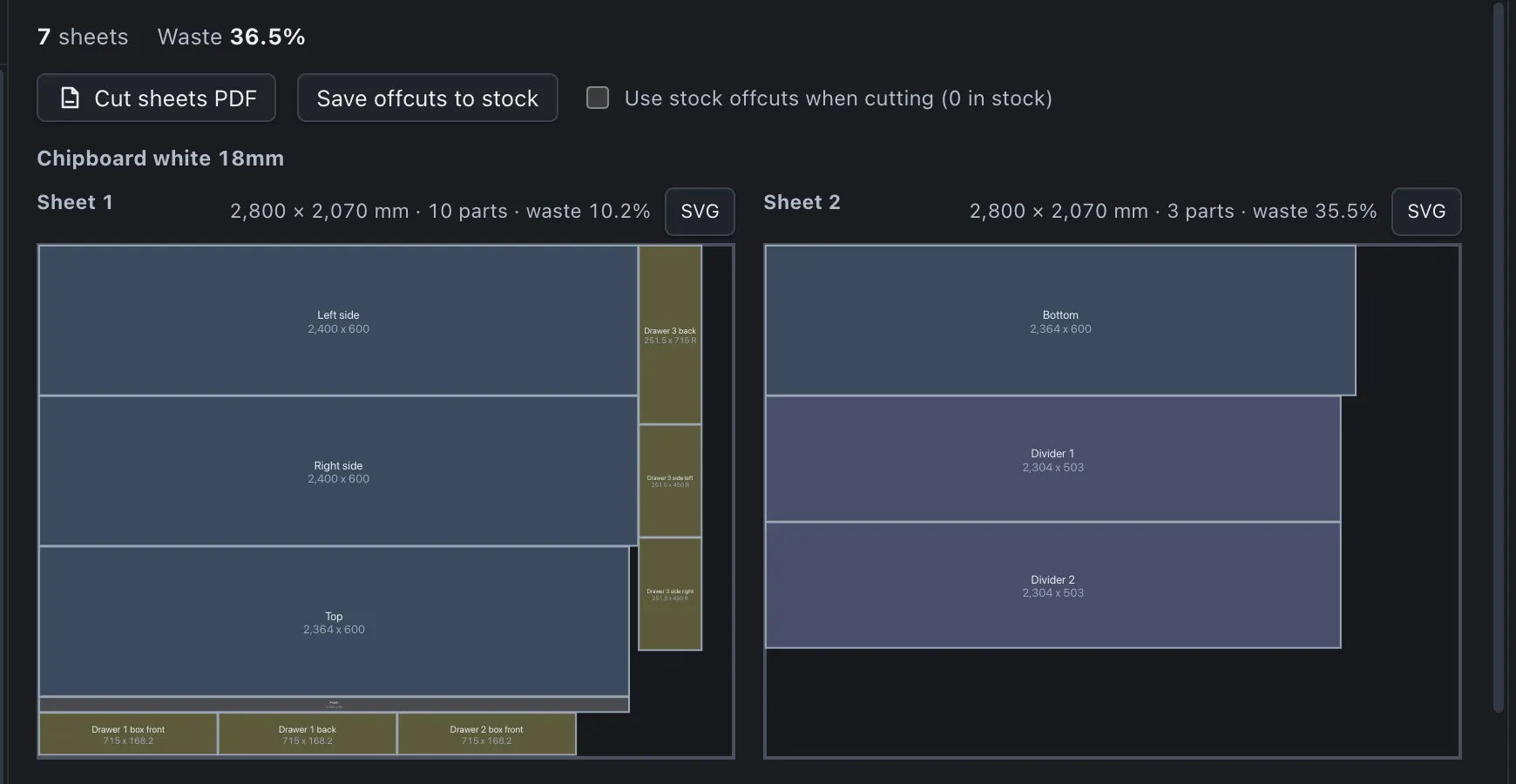
| Cut sheets | A3 landscape, one sheet per page, true scale | Sheet outline, dashed trim line, every part with id and size, grain arrows, kerf, trim and utilisation in the title block |
| Panel labels | A4 | One label per physical panel: name, dimensions, material, banded edges |
| Assembly sheet | A4 | Front drawing and numbered steps with parts and fittings |
| Drawings | A3 landscape, true scale | Front, side and plan with dimensions and a title block |
| Room view page | A4 landscape | The composite image, title block and optional quote summary |
PDFs are made in a hidden, script-free, offline window. They are printed in the document language you choose.
SVG: drawings and cut sheets
Drawings are A3 landscape SVG with the viewBox in paper millimetres and a width of 420 mm, so a print at 100 % is to scale. The scale is the smallest standard ratio (1, 2, 2.5, 5, 10 and so on up to 200) that fits. Visible parts are solid, hidden parts dashed, every part rectangle carries a data-part attribute with its id, and each dimension text carries a data-mm attribute with its value.
Cut sheet SVGs draw one sheet each at true scale with grain arrows when grain is known and the kerf visible as the gap between parts. With no parts, a drawing is still a valid SVG that says what is missing.
CSV: libraries and price lists
Boards, edge banding and hardware have CSV templates (Libraries > Template CSV). Imports merge by id. The delimiter may be a semicolon, a comma or a tab; a byte-order mark, quotes, decimal commas and header aliases are accepted. Boards can list alternate sheet sizes in one column, written like 2440x1220@30|2750x1830@36.
A number with one separator followed by exactly three digits after a one to three digit integer part, such as 2.800 or 2,440, is ambiguous and is rejected with both readings. Write 2800 or 2800.0, or 2.8. Forms such as 2.800,50, 2,800.50 and 2800,5 parse normally.
The price list import works on prices only: it matches by id, then by normalised name with thickness and sheet size, previews every change, and applies nothing until you confirm. It reads at most 5000 rows, 100 columns and 300 characters per cell, and recognises English, Bosnian and German headers.
The .panelcraft project file
A project is one JSON file that stores only your inputs: panels, materials, positions, settings and choices. Parts, the 3D model, the cut layout, the quote, drawings and assembly are derived when the file opens, so they cannot disagree with the design. Older wardrobe files still open. The file is written atomically and can be up to 50 MB.
Decor images are not stored in the project; a project opened elsewhere shows the flat colour until the images are imported on that computer.
The program in pictures


Export your first files
Download PanelCraft for Windows or macOS and run a real job through it, from drawing to quote. The 14-day trial includes every Studio feature.
Questions first? Write to hello@panelcraft.store or see the FAQ.